Triggers
Programming
Pause
Pauses trigger execution for a given amount of time.
ms(number) : Time in milliseconds to wait before preceding.With
Targets the following triggers on the given entity.
targetname(string) : New target name. Default: Re-targets the player.Variable
Updates the variable.
name(string) : REQUIRED: Name of the variable.value(string) : New value of the variable.
Map Variable
Updates the map variable.
name(string) : REQUIRED: Name of the map variable.value(string) : New value of the map variable.
Event Variable
Updates the event variable.
name(string) : REQUIRED: Name of the event variable.value(string) : New value of the event variable.
Entity Manipulation
Freeze
Freezes the target and prevents player input.
target(string) : Target to freeze. Default: PlayerUnfreeze
Unfreezes the target and allows player input.
target(string) : Target to unfreeze. Default: PlayerDestroy
Unfreezes the target and allows player input.
target(string) : Target to destroy. Default: The current target.Jump
Causes the target to jump.
height(number) : Number of pixels the target will jump by. Default: 8 pixels.Direction
Causes the target to face the given direction.
&direction=u or &direction=up
&direction=d or &direction=down
&direction=l or &direction=left
&direction=r or &direction=right
&direction=npc
direction=npc will cause the target to face the named npc (or the player using &direction=player).
Freeze Direction
Causes the target to freeze in the given direction regardless of motion. The player can still control their character. Example: climbing down a ladder. freeze-direction
freeze(yes | no) : If yes, freeze the player. If no, unfreeze the player.Path
Moves the target along the given path.
path(path) : Path for the target to follow. Default: Unsets the current path.In addition to those listed under the path datatype, you can limit the directions. For example,
&path=0dx0lx0u
lets the npc randomly look down, left, or up (but not right).
Speed
Sets the targets speed. Can be used on the player.
percentage(percentage) : Percentage of normal speed. Use50 for half speed or 200 for double speed.
Default: 100
Followers
By default, allies will use their leader's speed rather than this value. As an example, if you try
the ally will move with a speed of 100% because the player moves with a speed of 100%. To allow followers to have a different speed than their leader, set thefollow_speed variable to zero:
Frequency
Sets the targets frequency of movement (in movements per second).
num(any positive number) : Number of times per second to move. For example,&freq=2 (fast) or &freq=0.5 (slow). Default: 1
Usage
To set this value for an npc, the suggested usage is to give them a roaming area and then set the frequency once on load:
Icon Bubbles
Places an animated icon bubble above the targets head. Can be used on the player.
id(number) : Icon ID to display.stay(number) : If 1, the icon does not disappear. Default: 0.
silent(string)
: If silent, the icon plays without the sound effect. Defaults to nothing (plays sfx).
Default: Removes any icon.
Usage:
Create a permanent icon without playing sound: &icon=13,1,silent
Remove any icons from the target: &icon
| Icon Name | ID | Symbol |
|---|---|---|
| Exclamation | 1 |  |
| Ellipses | 2 |  |
| Smiley Face | 3 |  |
| Music Note | 4 |  |
| Comma | 5 |  |
| Joyful Face | 6 |  |
| Heart | 7 |  |
| Sad Face | 8 |  |
| Smiling Face with Open Mouth | 9 |  |
| Fish Icon | 10 |  |
| Angry Face | 11 |  |
| Battle | 12 |  |
| Haha | 13 |  |
| No. 1 | 14 |  |
| No. 2 | 15 |  |
| No. 3 | 16 |  |
| No. 4 | 17 |  |
| No. 5 | 18 |  |
| Poisoned | 19 |  |
| Surprised Face | 20 |  |
| Shaking Head | 21 |  |
| Question Mark | 22 |  |
| Asleep | 23 |  |
| Sweat Drop | 24 |  |
| Skull (Dead) | 25 |  |
| Big Red Exclamation Mark | 26 |  |
| Spectating Eye | 27 |  |
| Crying/Screaming | 28 |  |
| Egg | 29 |  |
| Flight Icon | 30 |  |
| Spanish Flag | 31 |  |
| Star No 1 | 32 |  |
| Star No 2 | 33 |  |
| Star No 3 | 34 |  |
| Star No 4 | 35 |  |
| Star No 5 | 36 |  |
| Quest (Not Started) | 37 |  |
| Quest (In Progress) | 38 |  |
| Quest (Completed) | 39 |  |
| Healer | 40 |  |
| Shop | 41 |  |
| TM | 42 |  |
| French Flag | 43 |  |
| Gift | 44 |  |
| Quest Star | 45 |  |
XY Coordinates
Instantly warps the target to the specified coordinates on the current map.
x(number) : X-coordinate to warp to.y(number) : Y-coordinate to warp to.
Moveto Coordinates
Moves the target to the specified coordinates on the current map by taking the straight-line path.
x(number) : X-coordinate to move to.y(number) : Y-coordinate to move to.
direction(string) : Direction to face while moving.
Default: Current Direction
Spectate Area
Opens a menu to spectate nearby battles within a specified radius. Useful for stadium-esque areas.
x (number) : The X coordinate of the center point to search for battles.
y (number) : The Y coordinate of the center point to search for battles.
radius (number) : The search radius in pixels to look for active battles.
Default: 80
Examples
Spectate battles near coordinates (100, 200):
Spectate battles within 150 pixels of (100, 200):
Notes: This command only works when the player is free (not battling or already spectating). If multiple battles are found, the player will be presented with a menu to choose which battle to spectate. If no battles are found in the area, a message will indicate that no battles are currently happening.
Follow
Forces the current target to follow another target.
target(string) : Specify the target to follow.Default: Unfollows.
Behind Player
Puts the current target behind the player.
Outfit
Sets the target’s skin.
skin(skinid) : Specify the skin ID for the target to change to.Delete Outfit
Removes a specific skin from the player's collection.
skinid (string) : The ID of the skin to delete from the player's inventory.
Notes: The skin will only be deleted if the player currently owns it.
Dye
Unlocks and/or equips outfit color variants for the player.
color (color name)
: Name of the dye color to unlock. Can specify multiple colors separated by commas. Options are red, grey, gray, orange, yellow, pink, green, lightblue, darkblue, purple, and teal.
silent : Suppresses the unlock notification and sound effect. Only applies to colors after the first one in the list.
equip : Automatically equips the next color specified after this keyword.
all : Unlocks all available dye colors at once.
deleteall : Removes all unlocked dyes and unequips the current dye. Used mostly for debugging.
Examples
Unlock a single color:
Unlock multiple colors:
Unlock and equip a color:
Unlock silently (no notification):
Unlock multiple colors, announce only the first, and equip one:
This unlocks lightblue (with notification), green (silently and equipped), and teal (silently).Unlock all colors:
Remove all unlocked dyes:
Notes: Color names are case-insensitive and whitespace is ignored. gray and grey are treated as equivalent. The equip keyword only affects the immediately following color.
Texture
Sets the target’s texture.
texture(sprite sheet) : Texture sprite to change to.Skin Color
Sets the target’s skin color.
id(number) : Skin color ID to change to.Default: 0
Ally
Sets the target’s allies, or following entities.
ally(skin) : Overworld skin of following ally. For multiple allies, separate with spaces.Floating
Causes the target to float.
height(number | yes) : Number of pixels high to float.yes defaults to 10 pixels.
Default: Stops Floating
Falling
Causes the target to fall, optionally spinning while they fall. The target will be teleported to the top of the screen and then fall to the center of the screen, similar to how players might fall in boulder holes from one level to the next in the canonical games.
Default: Does not spin
Rising
Causes the target to rise to the center of the screen. This is the reverse of &fall, and hence is most similar to the older canonical games' warp panel animations.
Default: Does not spin
Spin
Causes the target to rapidly change directions down, left, up, right.
choice(yes | no) : Should the target spin?Default: No
Rotation
Causes the target's sprite to rotate in-plane clockwise, either to the specified position or at the specified rate.
value(number)
: If speed is enabled, this is the rotational speed in degrees per second. Otherwise, this is the position (in degrees) to rotate to.
Default: Resets the rotation to zero
Usage:
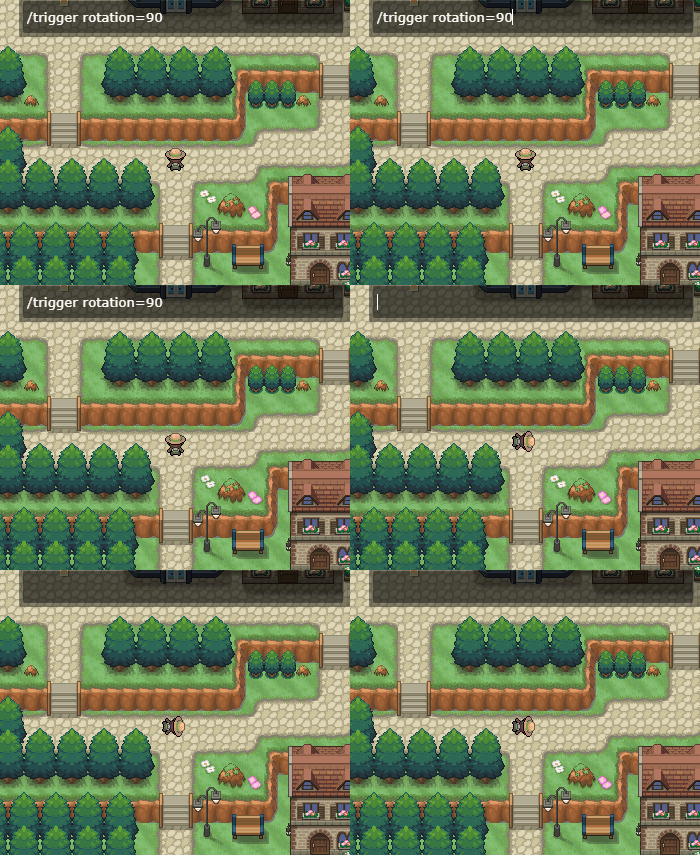
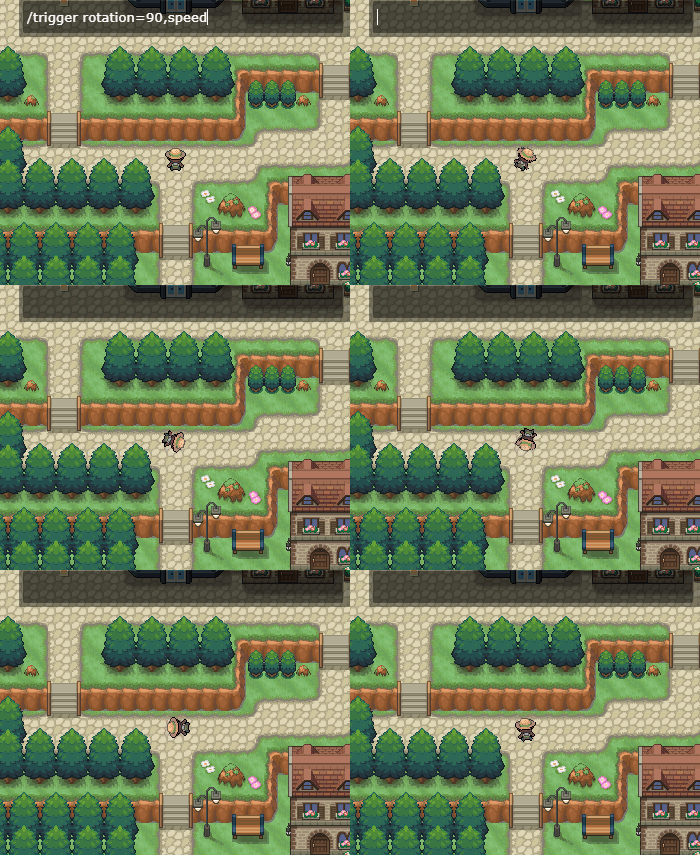
Use Wisely!
This is intended to animate rotating sprites such as windmills (so you don't have to create 30 frames for a fluid animation). Using it to rotate sprites such as the player is discouraged.
Solid
Turns the target solid.
choice(yes | no) : Should the target be solid?Default: No
Creates a fading trail behind the target.
choice(yes | no) : Type of trail to draw.Default: No trail
Outline
Creates a fading trail behind the target.
color(rgb) : Draws a colored outline around the target.Default: Removes Outline
Color
Sets the glow color of the target.
color(rgb) : Glow color. Three RGB values separated by commas.Default: Removes glow color
Glide
Causes the target to glide, which removes the target’s walking animation.
choice(yes / no) : Should the target glide?Default: No
Walk Through Walls
Causes the target to walk through walls.
choice(yes / no) : Should the target walk through walls?Default: No
Repel
Causes the target to repel wild Pokémon encounters.
choice(yes / no) : Should the target have repel activated?Default: No
Depth
Sets the depth of the target. See also Depth (data type).
z(depth) : Target’s new depth. Accepted formats are:fore- This has a depth of zero on the
forelayer fore+16fore-1616- This goes to the "map" layer
+16-16[empty]- map layer at zero depth
Default: 0
Opacity
Sets the target’s opacity.
percentage(percentage) : Target’s opacity.Default: 100
Fading Out/In
Causes the target's opacity to fade either out to 0 or in to 100 over time.
outOrIn(string) : Eitherout (default) or in
speed(number) : The speed at which the fading occurs. Default is 0.05 (in somewhat arbitrary units).
Untile
Removes a target’s ontile activation, allowing it to trigger an ontile condition again without needing to move.
Default: Current Target
Unspot
Resets a target who has spotted the player.
target(string) : Target to impact.Default: Current Target
Sprite Manipulation
Animate
Forces the target to animate. If the target is an NPC, it will force it to perform its walk animation.
percentage(percentage) : Percentage of the normal speed to animate at.Default: 100
Frame
Forces the target to pause on the given frame number.
frame(number) : Frame number to pause on.Default: 0
Sprite
Adds a new (potentially animated) sprite to the map. See animation().
Shadow
Adds or removes a shadow from the target. See also shadow (entity property).
Player Events
Warp
Warps the player to a spawn point on a different map.
map(number) : Map ID to warp to.spawn(number) : Spawn ID to warp to.
Textbox
Displays a textbox, separate to msg.
Answers
Gives the player one or more answers to select. Answers should be separated by commas.
answer(string) : A single answer.Textbox Nametags
Options for dynamically controlling the nametags in textboxes. See also NPC Nametags.
value(yes | no | string) : Eitheryes, no, or the name you want displayed.
- If
yes(default), the cached nametag is restored (if any exists). - If
no, it caches the previous nametag (if any) and turns off the nametag display. - If any other string is given, it caches the previous nametag (if any) and displays the new name.
Example
%random%=npc(01fz5kw8)
%random%.msg(<name:Jimmy,yellow>Hi.|Jimmy looks at you suspiciously...|Can I help you?|JIMMY!!!!!|....Uh-oh...)&nametag=no&|nametag=yes&|with=%random%&icon=1&nametag=Barb,pink&|nametag=yes
- Jimmy starts out with a nametag.
&nametag=noturns off Jimmy's nametag.&nametag=yesrestores Jimmy's original nametagwith=%random%&icon=1&nametag=Barb,pinkputs a!over Jimmy's head and changes the nametag toBarbin pink.- Changing the nametag like this does not change what the "original" nametag was (
Jimmyin yellow).
- Changing the nametag like this does not change what the "original" nametag was (
&nametag=yesrestores Jimmy's original nametag.
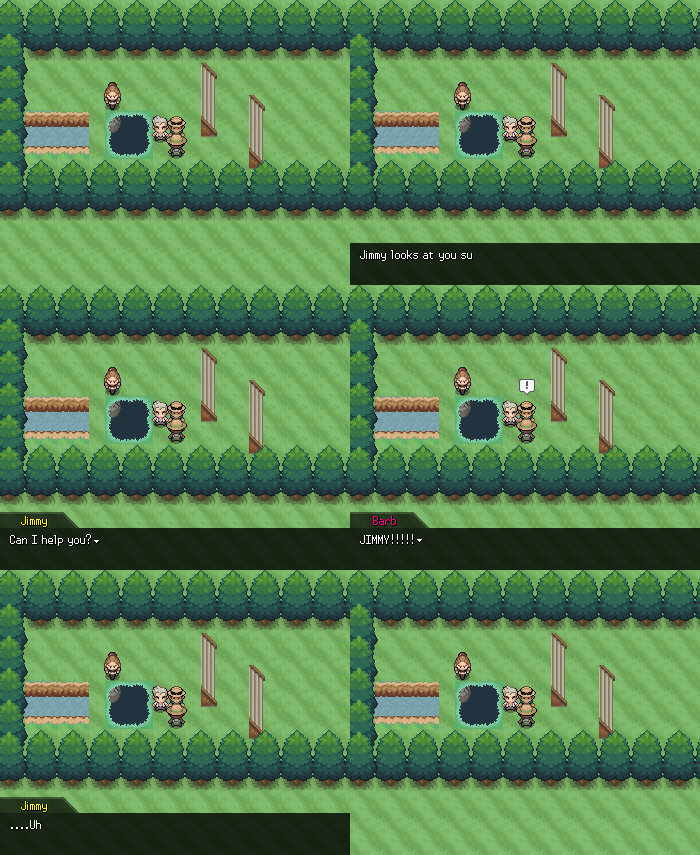
Note
This trigger only executes when the textbox is active. When the textbox is inactive, the &nametag trigger changes the visibility of the overworld nametags (above the player's head). See also Overworld Nametags.
Battle
Initiates a battle.
id(number) : Battle ID to initiate, either the trainer's battle ID (like 3378) or a Pokémon UID (like00xchwcw for Mewtwo).
No Blackout
Prevents the user from "blacking out" and heading to the Pokemon Center or defined heal point.
Answers
Gives the player one or more answers to select. Answers should be separated by commas.
answer(string) : A single answer.Message
Activates a target’s name.msg() property without the player needing to interact with them.
Default: Current Target
Item
Gives the player a given amount of some item.
item(string | number) : Name or ID number of the item.amount(number) : Number of items to give. Use a negative number to take items away from the player.
Default: 1
Use Item
Uses the given item from the player's bag (provided it exists). If this is a consumable item, it will exhaust one charge.
uid(string)
: The UID of the item to use (such as 06419qe1 for Repel).
Note
Due to the arbitrary nature of item coding, items cannot be used while a textbox is active. Code like this is possible:
Code where an item is used between messages is not possible:msg(Use this Repel!|That's a Repel, and it's on me this time!)&item=06419qe1,1,silent&useitem=06419qe1
&useitem trigger will be ignored.
Mon
Gives the player the generated Pokémon.
pokemon(pokemon) : Pokémon to give.Show
Shows the player a Pokémon.
pokemon(pokemon)) : Pokémon to show.Trade
Trades one type of Pokémon in the player’s party for a new Pokémon.
whom(pokemon)) : Type of Pokémon needed to trade.for_whom(pokemon)) : Pokémon the player receives.
Giveaway
Gives away one Pokémon forever, removing it from the player’s party
whom(pokemon)) : Type of Pokémon able to be given away.Money
Adds money to the player’s wallet.
amount(number)) : Amount of money to add. Use a negative number to take money away.Coins
Adds coins to the player’s coin case.
amount(number)) : Amount of coins to add. Use a negative number to take coins away..Starter
Gives the Pokémon to the player as a starter. Players may only receive one starter per region.
pokemon(pokemon)) : Starter Pokémon to give.Heal
Heals the target’s party.
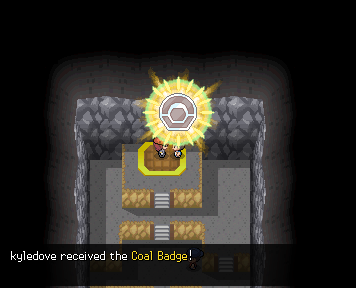
Badge
Gives the user a gym badge.
badge(number)) : Badge ID to give to the player.animate(string)) : If present, animates the badge with a jingle.
Achievement
Advances the given achievement by 1.
id(number)) : Achievement ID to advance.Travel
Activates the region travel menu.
PC
Activates the PC.
Hall of Fame
Activates the Hall of Fame cutscene for the current region.
dex(0/1))) : Display Dex progress at the end?Default: 0
Move Learner
Creates a move tutor interface of either the moves the mon should be able to know based on level, or from a given list.
&movelearner=max[:number];slot[:number];lock;illegal;cost[:itemUID|money|soot|coins|ev[evName]|mapVar[mapVarName] amount];moves[:moveUID,nextMoveUID,...]
If a region variable “move_learner_context” is set, users can right-click mons in their party to relearn moves directly.
Parameters are separated by ;.
&movelearner will open the move relearn interface, with no cost, allow the user to learn multiple moves without being kicked out, and let user swap between mons.
&movelearner=max:1;cost:money 1000;moves:07nhrhjt; will open a “move tutor” who costs 1000 money to learn a move, kicks the user out after teaching 1 move, and only teaches Explosion.
max(number)))
: The number of moves that can be learned in this instance of using the tutor. Used in conjunction with cost: to forcibly close the tutor after a move is learned.
slot(number)))
: A number between 1 and 6, specifies which mon the tutor should open to. Defaults to 1. Ex: slot:3 would open to the third slot.
lock
: Specifying just lock; will make it so the user cannot swap to different mons while in the interface.
illegal : Allows moves in the interface to be taught regardless of whether or not the mon should be allowed to know it. USE WISELY.
cost(string)))
: List of values in type amount, type2 amount2, etc.; format, separated by commas.
What cost should be paid per move learned. It is HIGHLY recommended you also set max:1 when using this. The tutor interface does NOT check if the user can pay said cost, you will need proper if conditions preceeding its use.
This supports itemUIDs, money specifications such as money, soot, coins, or even ev or mapVar for using ev[BP] etc. If no amount is specified, the default value 1 will be used. If the mapVar or ev doesn’t exist, one will be made at value 0 and the amount will be subtracted from it.
Multiple costs may be defined by separating each with commas, and ALL costs will be paid upon teaching a move.
Costs will be paid upon the move being taught and saved, to avoid refresh-cheating the system’s costs.
moves(string)))
: String of move UIDs separated by commas. moves:UID,UID2,UID3,etc.;
Optional, but if provided will change this interface from a “move relearn” interface to a “move tutor” interface.
Shop
Creates a shop with the listed items and prices. An infinite list of items can be provided, with each item being separated by a comma.
item(string | number))) : Item name or number to sell.price(number))) : Price for one item. This price cannot be less than the item’s sell price.
Default: Default Price
Limited Item Shop
If the price of an item is negative, it is treated as a limited stock. For example,
would create a limited item shop that has 10 Poke Balls, unlimited Great Balls, and 1 Master Ball.
Note that TMs are always a limited stock of 1
Buy
Creates a shop with the listed items and prices, similar to &shop. However, the player may not sell items here; only the buy option is activated.
item(string | number))) : Item name or number to sell.price(number))) : Price for one item. This price cannot be less than the item’s sell price.
Default: Default Price
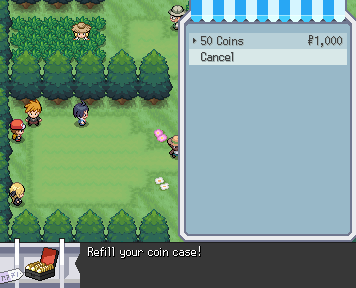
Dummy Items
Instead of purchasing a real bag item, players may purchase "dummy items" that execute triggers instead.
Note here that the square brackets are literal square brackets and not optional variables.name(string))) : The name of the dummy item.
icon(string))) : The UID of the icon to use (for UI purposes).
desc(string))) : The shop description the player can read when selecting the dummy item.
trigger(string)))
: Triggers that happen when you purchase the item. Use | instead of & for chains of triggers (formatting compromise).
max(number))) : Max quantity purchasable at once. Default: unlimited.
close(number))) : 1 closes the shop immediately after purchasing. 2 closes the shop, waits for all triggered textboxes/cutscene to finish, then reopens. When not set, the shop behaves as normal.
price(number))) : Price for one item.
For example, the following sets up a shop to purchase 50 Coins:
&buy=dummyItem[name:"50 Coins";icon="06q3svbf";desc="Refill your coin case!";trigger="ev[coins]=+50";]:1000
Sell
Creates a menu that only allows the player to sell items.
Replay
Replays a previous battle for the player. Basically initiates a battle where the player does nothing.
id(number))) : Replay ID to watch.Rival
Puts the /rival command into the player’s chat.
Cycle
Causes the player to start riding a bicycle.
choice(yes | no))) : Ride a bicycle?Default: No
Surf
Causes the target to start surfing.
choice(yes | no))) : Surf?Default: No
Fish
Causes the target to start fishing.
rod(string))) : If not blank, causes the target to attempt to fish using the specified rod (such asoldrod). See also the Fishing System Overview.
nobobber(string)))
: nobobber can be added to skip the casting and bobber animations.
noitem(string)))
: noitem can be added to suppress the ability to fish up items.
Default: Blank
Example usage: &fish=oldrod,nobobber,noitem
Safari
Puts the player in a Safari Zone, where they have a certain number of steps before being warped away.
steps(number))) : Number of steps in the Safari Zone.Default: Unsets the state
Incense
Opens the incense menu for the player, allowing them to set the currently active incense. (Incense affects eggs produced in the daycare.)
Daycare Test
Runs unit tests for the daycare system, including incense.
i or incense (number) : The incense ID to test.
Default: The currently active incense
n or number (number) : Number of test iterations to run.
Default: 10000
s or subcase (string) : Subcase identifier for the test:
- "a" (default): Use whatever mons are currently in the daycare.
- "b": Use two Bulbasaurs (87.5% male ratio).
- Mom has perfect IVs except for speed (0), holds a Power Bracer, is in a Love Ball, and has an OT of 1.
- Dad has perfect IVs except for HP (0), holds a Destiny Knot, is in an Ultra Ball, and has an OT of 186753.
- "c": Use Nidoran♀/Nidoran♂ (50% ratio, different species)
- Parents have the same features as the Bulbasaur couple except no held items.
Default: "a"
Examples
Test Incense #7
Using full parameter names:
Notes: This is a development/testing command and is not allowed in any live maps.
Game Appearance
Fadeout
Fades the screen out to a solid color.
color(hex))) : Solid color to fade out to.Default: Black
Fadein
Fades the screen in, starting from the given color.
color(hex))) : Solid color to fade in from.Default: Black
Flash
Flashes the screen with a solid color.
color(hex))) : Solid color to flash.Default: White
Palette
Changes the game’s palette. Used in retro maps.
hexhex(string))) : Two colors, formatted as twelve hexadecimal digits ([0-F]{12}) all together. The first six digits represent the primary color, and the second six digits represent the secondary color.
Default: Unsets
Dawn
Changes the game time to dawn (06:00).
Day
Changes the game time to day (12:00)..
Dusk
Changes the game time to dusk (18:00).
Night
Changes the game time to night (20:00).
Time
Changes the game time.
h:m(string))) : Time in 24-hour format.Default: Resets to server time
Lighting
Changes the game’s overlay lighting.
color(rgb))) : Color of the game's overlay lighting.Default: Resets to map or time lighting
Shake
Shakes the screen, as if there was an earthquake.
x(number))) : Number of pixels to shake horizontally.Default: 0
y(number))) : Number of pixels to shake vertically.
Default: 0
Lookat
Moves the game camera to the given coordinates on the map.
There are four modes:
The default mode makes the camera look at the player. - The speed is 1/10 of the distance to the player per frame. - The movement happens every tick, so this method is fps-dependent. In player mode, you can control the number of pixels moved per frame and how long each frame is. For an extreme example, uselookat=player,64,1000, which makes the camera move 64 pixels in 1 second increments (very choppy).
Similar to player mode, you can look at a specified coordinate. For example, &lookat=0,0,64,1000.
In NPC mode, you can look at named NPCs just like you do with the player. Due to a bug, the second argument can be anything (even blank), but must exist. For example, &lookat=lady, or &lookat=lady,,64,1000.
Recommended Values
To avoid fps-dependent camera lookats, it's recommended that you always use the px_per_frame and frame_duration parameters. The smoothest transitions happen when px_per_frame is 1. Some values for frame_duration might be 25 (slow), 10 (medium), or 1 (fast).
Weather
Sets the weather the player sees.
type(string))) : Type of WeatherOptions: downpour, rain, storm, blizzard, snow, hail, hailstorm, fog, mist, spooky, sandstorm, soot, kyle, cherry, confetti, overcast, harsh sunlight, strong winds
Default: Resets to no weather.
Overworld Nametags
Sets the visibility of the nametags above the player's head.
visible(yes | no) : If yes (default), your nametag is shown.Note
This trigger only executes when the textbox is not active. When the textbox is active, the &nametag trigger changes the textbox nametag (denoting the person speaking). See also Textbox Nametags.
Sounds
SFX
Plays a sound file.
sound(string))) : Some name of a.ogg file.
Track
Plays a sound track.
track(string))) : Track to play. Track can be some name of a .ogg file, or it can be a hosted music piece. See Music Settings and Uploading for more details in the How To Guides.Default: Stops playing any track.
Track Fadeout
Fades out the currently playing track.
time(number))) : Fading happens overtime ms to a final volume of zero.
url(string)))
: When the fadeout ends, a replacement track (url) is played at full volume (if it exists).
Default: Fades out the currently playing track over 1000 ms.
Note
Can be combined with &trackfadein to achieve cross fading via
&trackfadeout&trackfadein=url
Track Fadein
Immediately stops the current audio and fades in a new track.
time(number))) : Fading happens overduration ms.
vol(number))) : The ending volume.
loop(loop)))
: If just loop, the new audio will loop. If loop:t1, the audio will loop about the ending time t1 in ms. If loop:t1-t2, the loop will happen between the two times t1 and t2 in ms.
Example
&trackfadein=url,duration:1000,volume:100,loop:0-1000
Note
Can be combined with &trackfadeout to achieve cross fading via
&trackfadeout&trackfadein=url
Cry
Plays a Pokémon cry.
pokemon(ID))) : Plays a Pokémon’s cry based on ID of Pokemon entered.Client Properties
Zoom
Changes the client’s game window scale.
track(string))) : Zoom setting. Use1 for 100%, or use 0.5 for 50%.
Default: 2 for 200%
View
Sets the dimensions of the client’s game window.
wxh(string))) : Width and height of the game window. Usenormal to reset.
Default: normal
Filter
Generates a filter over the game screen.
type (string) : Filter to display.
Options (options and defaults):
-
crt -
linecontrast:0, curvature:0.5, noise:0 -
oldfilm -
noise:0.1 -
glitch - none
-
shockwave -
centerX:0, centerY:0, amplitude:30, brightness:1, radius:-1, speed:500, wavelength:160, time:0Note: if
centerX<1andcenterY<1, coordinates are treated as fractions of the screen size. They are treated as pixel distances otherwise. -
bloom -
threshold:0, bloomscale:1.2, strength:2, strengthx:undefined, strengthy:undefined -
ascii -
size:8 -
godray -
angle:30, gain:0.5, lacunarity:2.5, parallel:1, centerX:0, centerY:0, time:0, alpha:1 -
rgbsplitter -
redX:0, redY:0, greenX:0, greenY:0, blueX:0, blueY:0 -
pixelate -
size:2 -
underwater -
count:0
Default: Remove any filter
Other
Refresh
Refreshes the client’s game. Equivalent to pressing F5 on desktop.